Controls and configuration
New UI walkthrough
The following instructions apply to the new UI. You can try the settings on the device.
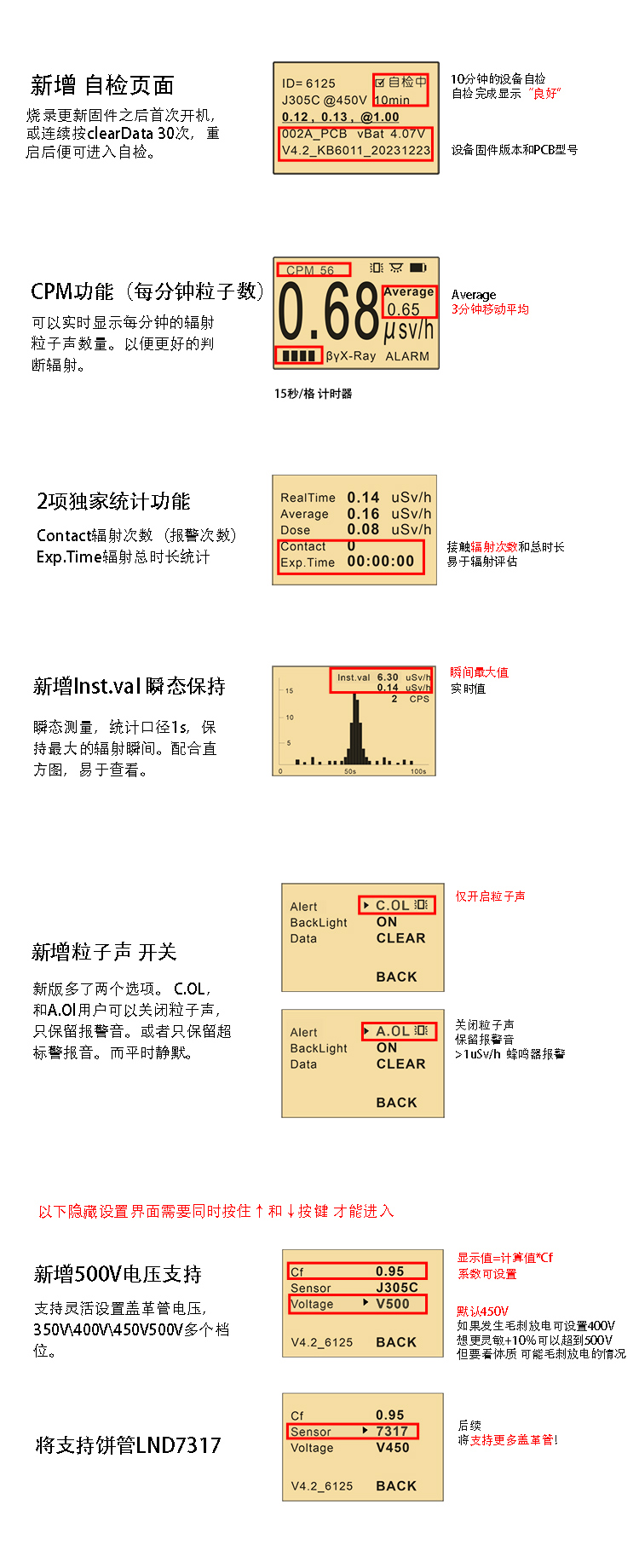
Opening advanced settings
Hold the Up and Down buttons at the same time to open the advanced-settings page.
- Select the sensor model: the mica-window firmware is calibrated for GJ5250 by default. If your detector uses LND7317, set Sensor to 7317 in advanced settings.
- Adjust brightness: firmware V4.5 and later supports display-brightness control for better battery life. It also adds a low-battery dialog and reserves automatic shutdown at 10–20% remaining charge to protect long-term battery life.
Reading tips
- In high-dose environments, check Inst.val (instantaneous maximum) in the CPS histogram to locate peak points quickly (see Specifications and performance).
- Starting with V4.5, dose-rate values above 20 µSv/h refresh continuously every second; measurement speed above 12 µSv/h is also significantly improved.
- The CF (calibration factor) can be adjusted from 0.1 to 3.0 (V4.5 and later). Users with access to a reference source can fine-tune it against that source.
Firmware upgrades
In addition to button and UI controls, the KB6011 supports firmware upgrades through its USB-C port. See Downloads and firmware for the procedure.